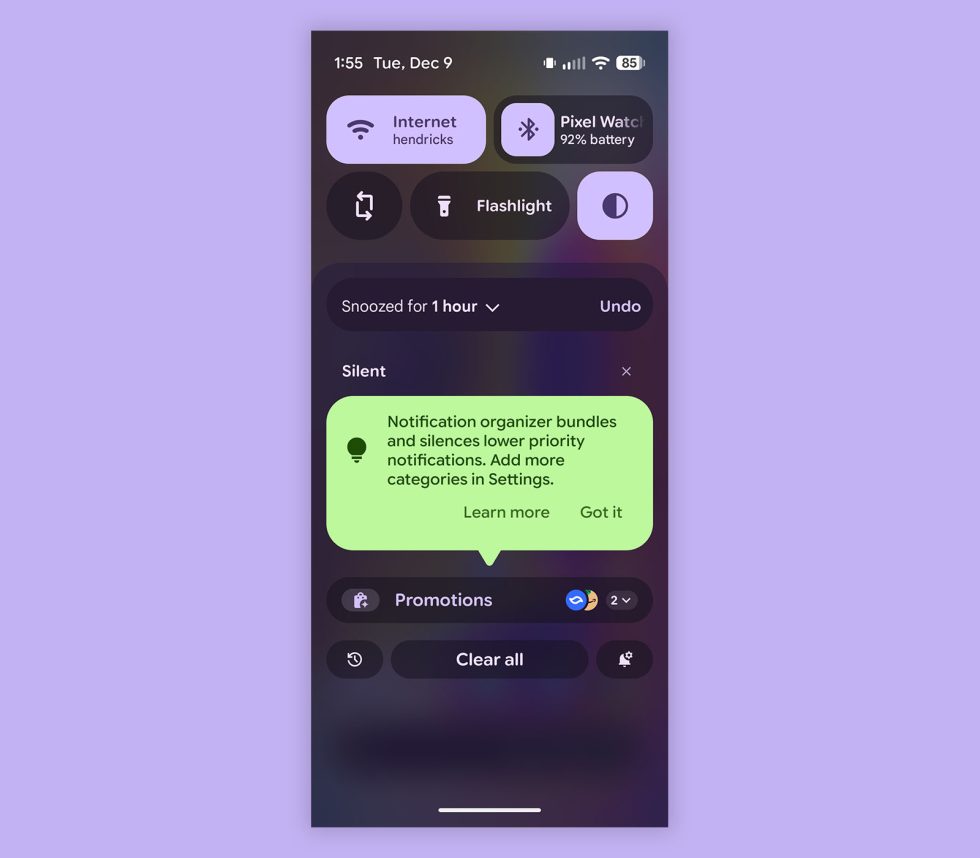
Google is rolling out a surprise feature today to its Pixel phones called “Notification Organizer.” As the name implies, this is a new setting that will indeed try to organize your notifications in the same way that Gmail attempts to bundle and clean-up your inbox. For me, this is an instant turn-off type of setting, but since some of you may like it, we’ll talk about where to find it.
The Notification Organizer setting is currently rolling out and turning itself on by default. I wish it wouldn’t, but that’s how Google has decided to push it. When your Pixel phone gets it, you’ll see a bubble in your notification shade that says “Notification organizer bundles and silences lower priority notifications,” and that you can “Add more categories in Settings.”
googletag.cmd.push(function() {
var mapping = googletag.sizeMapping().
addSize([0, 0], [[300, 100], [300, 250]]).
build();
googletag.defineSlot( ‘/1043061/DL_INJECT1’, [[300,100],[300,250],[300,600]], ‘gpt-ad-4265744938833-0’ )
.addService(googletag.pubads()).defineSizeMapping(mapping);
window.advadsGamEmptySlotsTimers = window.advadsGamEmptySlotsTimers || {};
const timers = window.advadsGamEmptySlotsTimers;
timers[‘gpt-ad-4265744938833-0’] = setTimeout( function () {
const id = ‘gpt-ad-4265744938833-0’;
document.dispatchEvent( new CustomEvent( ‘aagam_empty_slot’, {detail: id} ) );
delete ( timers[id] );
}, 1000 );
if ( typeof window.advadsGamHasEmptySlotListener === ‘undefined’ ) {
googletag.pubads().addEventListener( ‘slotRequested’, function ( ev ) {
const id = ev.slot.getSlotElementId();
if ( typeof timers[id] === ‘undefined’ ) {
return;
}
clearTimeout( timers[id] );
timers[id] = setTimeout( function () {
document.dispatchEvent( new CustomEvent( ‘aagam_empty_slot’, {detail: id} ) );
delete ( timers[id] );
}, 2500 );
} );
googletag.pubads().addEventListener( ‘slotResponseReceived’, function ( ev ) {
const id = ev.slot.getSlotElementId();
if ( typeof timers[id] !== ‘undefined’ ) {
clearTimeout( timers[id] );
delete ( timers[id] );
}
if ( ! ev.slot.getResponseInformation() ) {
document.dispatchEvent( new CustomEvent( ‘aagam_empty_slot’, {detail: id} ) );
}
} );
window.advadsGamHasEmptySlotListener = true;
}
googletag.enableServices();
googletag.display( ‘gpt-ad-4265744938833-0’ );
} );
If you head into the settings for it (Settings>Notifications>Notification organizer), you’ll find even more info on this new idea. It claims that it uses AI on your device to organize things, that it “may sometimes make mistakes,” and that you can choose which types of notifications you bundle and silence. There’s also a toggle right away that lets you turn it off (I did).
If you want to dive in further, there are boxes to check for Promotions, News, Social, and Suggested. You can check some or all, decide to “Always expand bundles,” and manage the apps that you don’t want included. So there are some controls here to let you fine tune the system some.

For those curious, this new organizer is available in the US, UK, Japan, Germany, Canada, and Australia. Google has more info here.

Read the original post: Google Adds Notification Organizer to Pixel Phones: How to Turn It Off
https://www.droid-life.com/2025/12/09/google-pixel-notification-organizer-how-to-turn-it-off/?rand=7